

Most businesses start a signature pad purchase by comparing screen sizes and brands. The purchases that go wrong usually go wrong somewhere else: the pad does not work with the software staff actually use, nobody has decided where signed records will be stored, or the signer cannot see what they are agreeing to. This guide is a practical framework for choosing an electronic signature pad in Australia. It is not a product catalogue. Datascan already has guides to Topaz signature capture devices and to SigLite versus SignatureGem pads. This one gives you the questions to answer before you compare any models.
The short answer: choose the workflow and software first, then the pad. Confirm the pad works with your operating systems and applications, decide whether signers need to see content on the pad’s own screen, match the connection type (USB, serial or network) to where the pad will sit, and settle who stores and protects the signed record. Only then compare durability, support and total cost.
What is an electronic signature pad?
An electronic signature pad is a small input device that captures a handwritten signature as digital data. The signer writes on its surface with a pen or stylus, and the pad passes the pen movement to a computer or to software that places the signature in a document or record. People also call it a digital signature pad, a signature capture device or an e-signature pad.
A pad is only one way to sign electronically. It helps to know where it fits:
| Signing method | How it works | Where a signature pad fits |
|---|---|---|
| Handwritten signature capture | The signer writes on a pad, tablet or touchscreen and the handwriting is captured digitally. | This is what a signature pad does. It suits in-person signing at counters, reception desks, delivery handovers and consultations. |
| Click-to-sign | The signer clicks, taps or types in a web page or app. No hardware is needed. | Better for remote signing. A pad is not required. |
| Certificate-based digital signature | A cryptographic signature tied to a digital certificate protects the document’s integrity and signer identity. | Can be combined with handwritten capture, depending on the software you choose. |
Datascan’s electronic signature solutions page covers all three approaches, including hardware, software and integration options.
Why do businesses use signature pads?
Signature pads tend to be used where a person is physically present and a signature is part of a routine transaction. Common reasons include:
- Removing printing and scanning. The signature goes straight into the electronic document or record instead of onto paper that someone has to scan and file.
- Keeping the signature with the right document. Software can attach the signature to the exact file or record being signed, which is harder to guarantee with paper.
- Showing the signer what they are agreeing to. Pads with a screen can display text, prompts or checkboxes before signing.
- Speeding up counter and reception work. Retail, healthcare, banking, government and professional services use pads for consent forms, delivery confirmations, account forms and similar documents.
For a real example, see Datascan’s hospital e-signature case study.
How do you choose an electronic signature pad?
Work through the questions below in order. Each one narrows the field, and most of them have nothing to do with the price on the product page. Before you start, write down four things: who signs, where they sign, what they sign, and which system records the result.
Compatibility: will it work with your systems?
This is the question that decides most purchases. A signature pad needs a driver or software layer to talk to your application, so check each of these:
- Operating system. Confirm the exact versions you run, including any Mac or Linux machines.
- Browser-based applications. Topaz’s browser SDK, SigWeb, supports Firefox, Chrome, Edge, Opera and IE11+ on Windows 10 or later. Topaz’s SigWeb page notes that it does not work in shared desktop environments (SigPlusExtLite is the alternative there) and that newer Chrome and Edge versions may prompt for Local Network Access permission.
- Remote desktop and Citrix. If staff work through remote sessions, confirm this specifically. Some models are listed for it, such as the SigLite LCD 1×5 high-performance USB, which Datascan lists as Citrix Ready.
- Custom or in-house software. Topaz publishes SDKs for ActiveX, .NET, Java and C++ development, so check which one matches your application. See the Topaz software and SDK list.
- No-install options. Some pads work differently. Datascan describes the StepOver NextGen Pad 5 as working independently, without additional software installed on the PC.
Ask the supplier to confirm compatibility with your application version in writing, and test one unit before you order a batch.
Signature capture quality: what does it actually record?
Most modern pads are pressure-sensitive and capture more than a picture of the signature. Topaz describes its devices as capturing biometric and forensic data, and StepOver’s product pages list pressure, speed and writing direction as part of the signature data. Whether you need that depends on your documents and your risk appetite. In practice, check three things: the signing area is large enough for how your customers really sign, the pen or stylus feels natural, and the captured signature looks right in your document. Put a staff member and a customer in front of a demo unit rather than judging from a photo.
LCD display: does the signer need to see the document?
Display type is the biggest practical difference between pads:
| Display type | What the signer sees | Best suited to | Trade-off |
|---|---|---|---|
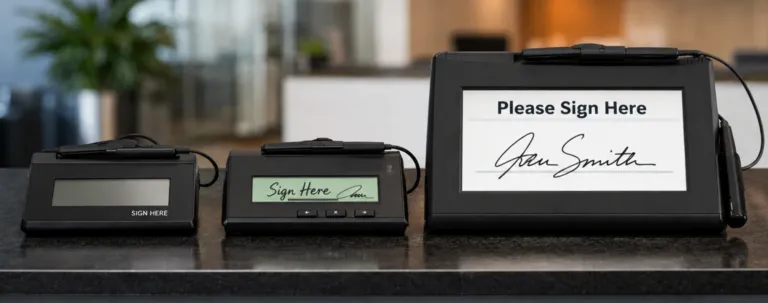
| No screen | Nothing on the pad. The signature appears on the computer monitor. | Back-office or desk use where the signer is looking at the computer screen anyway. | Signer cannot see prompts on the pad itself. Datascan lists two models of this kind, the SignatureGem 1×5 T-S261 and SigLite Slim 1×5 T-S461, as End of Life from 30 September 2026, so check availability. |
| LCD “electronic ink” | The signature appears under the pen tip, and some models show simple text, graphics and pen-tap checkboxes. | Counters and reception, where the signer should see their own signature and any prompts. | Small screens limit how much text can be shown. Examples: SigLite LCD 4×3 and SignatureGem LCD 4×3. |
| Larger LCD, up to full colour | A larger display with more room for text and graphics. | Higher-volume or more demanding signing points. Examples: SignatureGem 5×7 colour (5.7 inch, 640×480 colour) and SignatureGem 4×5 (QVGA 320×240). | A larger device than a basic pad, so weigh the extra screen against what your signers need. |
| Colour screen with document view | The document itself is displayed on the pad. | Sign-in-person workflows where the signer reads before signing. Examples: duraSign Pad 5.0 (5 inch colour, 800×480) and the NextGen Pad 5. | Feature set depends on the software and configuration you use. |
| Tablet display | A tablet-style display that can show documents, video or advertising as well as capture signatures. | Reception desks and consultation rooms. See the GemView tablet display guide and the GemView 7. | A larger device than a basic pad. Check mounting and software support (Topaz lists a SigPlus Pro Tablet SDK for GemView displays). |
If signers are agreeing to something specific, such as consent wording, terms or a delivery condition, a screen on the pad (or a document view) reduces the chance that someone signs without seeing it. Browse the LCD signature pads range to see the options.
Connectivity: how will the pad connect?
- USB is the common choice for a single workstation, and Datascan lists a range of USB signature pads.
- Serial or dual serial/USB matters if you have older systems. Models such as the SigLite LCD 4×3 and SignatureGem LCD 4×3 are listed with dual Serial/USB connections.
- Network connection suits shared devices. Datascan notes that StepOver’s network-capable pads need the Ethernet Connection Kit to be used over a network. See the NG signature pads.
Also think about cable length, desk layout and whether the pad will be passed to customers.
Software integration: where does the signature end up?
The pad captures the signature. Software decides what happens next. You generally have four routes:
- Bundled tools. Datascan’s Topaz product pages state that Topaz software tools and updates are bundled with the pads at no extra charge.
- Ready-made signing software. For PDF signing, Datascan supplies StepOver’s eSignatureOffice (Windows desktop) and the cloud-based webSignatureOffice.
- An API for your own system. The StepOver Signature API is described as an interface for building an e-signature system that embeds signature data in PDF/A documents.
- Your own application. Use the manufacturer’s SDK, as described above.
Ask where the signature is stored (in the PDF, in a database, or both), and whether it is linked to the document in a way that shows later changes.
Security and data handling: who protects the signed record?
A signed document usually contains personal information, and some signature data may be more sensitive than it looks. Decide these points before rollout, not after:
- Where is it stored and who can access it? Define retention periods and access rights.
- Is the data protected in transit and at rest? Some vendors encrypt signature data in the pad itself. StepOver’s naturaSign page, for example, says biometric data is encrypted in the pad and transmitted securely.
- Are you meeting your privacy obligations? Under Australian Privacy Principle 11, an entity must take reasonable steps to protect personal information from misuse, interference, loss and unauthorised access. See the OAIC’s APP quick reference. If you plan to use signature or fingerprint data to verify identity, get privacy advice first.
- Is the signature legally adequate for your document? Under section 10 of the Commonwealth Electronic Transactions Act 1999, an electronic signature can satisfy a legal signature requirement where the method identifies the person and shows their intention, the method is reliable enough for the purpose (or proven to work), and the other party consents. State and territory laws also apply, and some document types have extra requirements. Check with your legal adviser rather than assuming one setup covers everything.
Durability: will it survive your environment?
A pad on a quiet office desk and a pad on a busy retail counter face very different treatment. Look at the signing surface and build:
- Tempered glass surfaces, used on the SignatureGem range, are described as rugged.
- StepOver’s 5-inch duraSign pad combines a 3 mm polycarbonate ABS housing with a tempered glass surface, positioned for reception desks and counters.
- Some models, like the IDLite LCD 1×5 fingerprint combo, use a touchscreen and stylus instead of a tempered glass surface.
- For shared pads, consider pens: the SignatureGem 5×7 and 4×5 listings mention an antimicrobial GemGuard pen, and tethered pens are less likely to go missing.
Support: who helps when something goes wrong?
Ask about warranty terms for the exact model (they differ by product), who handles faults in Australia, how driver and SDK updates are delivered, and whether spare units are available. Check the product lifecycle as well. Datascan’s listings for the SignatureGem 1×5 T-S261, SigLite Slim 1×5 T-S461 and SigLite LCD 1×5 T-L460 show End of Life from 30 September 2026. If you are standardising across many sites, pick a model with a clear future rather than one being phased out.
Total cost of ownership: what will it really cost?
The pad is only one line of the budget. A fair comparison counts all of these:
| Cost item | One-off or ongoing? | Question to ask |
|---|---|---|
| Pads for every signing point | One-off | How many locations and counters need one, plus spares? |
| Mounting, cables or network kit | One-off | Does the connection type need extra hardware, such as an Ethernet kit? |
| Signing software or API | One-off or subscription | Is software included, or licensed separately? |
| Integration and testing | One-off | Who does the work, and how long will it take? |
| IT deployment and staff training | One-off | Can IT push the drivers to all machines? |
| Support and replacement | Ongoing | What happens when a pad fails or reaches end of life? |
| Paper, printing and scanning saved | Ongoing (saving) | How many signed documents does the pad replace each month? |
Prices vary by model, software and integration, so we have not listed any here. See current pricing on the product pages or
for your setup.What are the most common mistakes when buying a signature pad?
- Buying the pad before checking software compatibility. This is the most expensive mistake.
- Choosing a no-screen pad when signers need to see content. If consent wording matters, show it.
- Ignoring remote desktop, Citrix or browser limits. Check these early.
- Skipping a pilot. Test one unit with real staff and customers before a multi-site rollout.
- Having no plan for storage and retention. Decide who holds signed records and for how long.
- Assuming one signature method suits every document. Some documents have extra legal requirements.
- Underestimating durability at shared counters. Cheaper, lighter pads can suit a desk but not heavy use.
- Overlooking the product lifecycle. Standardising on a model near end of life creates problems later.
Signature pad comparison: which one should you consider?
Use this as a starting point, then confirm the details against the product page and your own requirements. It is a shortlist guide, not a ranking.
| If your situation is… | Start by looking at | Why |
|---|---|---|
| A desk or counter where the signer should see their signature and simple prompts | SigLite LCD pads | An LCD shows “electronic ink” under the pen, and Datascan positions the SigLite range as compact and cost-effective. |
| A busy, shared counter that needs a rugged surface | SignatureGem LCD pads | Tempered glass surfaces and larger display options up to 5×7 colour. |
| Signers need to read a document on the pad, or several users share one device | StepOver pads, including the NextGen Pad 5 | Document view on the pad, and network capability with the Ethernet kit. |
| You want a larger display that does more than signing | Tablet display signature pads | A tablet-style screen for documents and content as well as signature capture. |
| You also need fingerprint identification (and have checked privacy requirements) | The IDLite LCD fingerprint combo | Combines signature capture with a fingerprint sensor in one device. |
| You are building signing into your own software | The Signature API or a Topaz SDK | Gives developers a supported integration route. |
Still unsure how Topaz’s own ranges differ? Read the electronic signature pads guide or browse the full Topaz range.
Frequently asked questions
What is the best electronic signature pad for an Australian business?
There is no single best pad. The right choice depends on your software, how many people sign, where signing happens and what the signer needs to see. A small office with one desk has very different needs from a retailer with many counters.
Do I need an LCD signature pad?
Not always. A pad without a screen can work if the signer watches the computer monitor. An LCD or document-view pad is better when the signer needs to see their signature, prompts or the document on the pad.
Are electronic signatures legally valid in Australia?
Often, yes. Section 10 of the Electronic Transactions Act 1999 sets out when an electronic method can satisfy a signature requirement under Commonwealth law, and state and territory laws also apply. Some documents have additional requirements, so check with your legal adviser.
What is the difference between a signature pad and e-signature software?
A signature pad is hardware that captures a handwritten signature. E-signature software places that signature in a document or record, or handles click-to-sign without any hardware. Many businesses use both.
Will a signature pad work with Citrix, remote desktop or browser apps?
Possibly, but check the specific model and software. Topaz notes that SigWeb does not work in shared desktop environments, and it points to SigPlusExtLite for those cases. Some models are listed as Citrix Ready.
Can several staff share one signature pad?
Yes, in some setups. StepOver’s network-capable pads can be used over a network with the Ethernet Connection Kit. Otherwise, a USB pad is typically connected to one workstation.
What is the difference between SigLite and SignatureGem pads?
Both are Topaz ranges. Datascan describes SigLite as compact and cost-effective, and SignatureGem as rugged with tempered glass surfaces. Our SigLite versus SignatureGem comparison goes through the individual models.
How much does an electronic signature pad cost?
Pricing depends on the model, screen type, software and integration work. Check the current price on each product page or contact Datascan for a quote based on your requirements.
How should I protect signature data?
Decide where records are stored, who can access them and how long you keep them, and use encryption where the software supports it. Under Australian Privacy Principle 11, you must take reasonable steps to protect personal information.
Conclusion
Choosing an electronic signature pad is mostly a workflow decision. Start with who signs, where, and what system records the result. Then check compatibility, decide how much screen the signer needs, match the connection type, plan for security and legal requirements, and count the full cost including support and product lifecycle. A short pilot with one unit will tell you more than any specification sheet.
Talk to Datascan about your signature pad requirements
If you want help matching a pad to your software and workflow,
and tell us what you sign, where, and which systems you use. You can also review the full signature pad range or the electronic signature solutions overview first.